

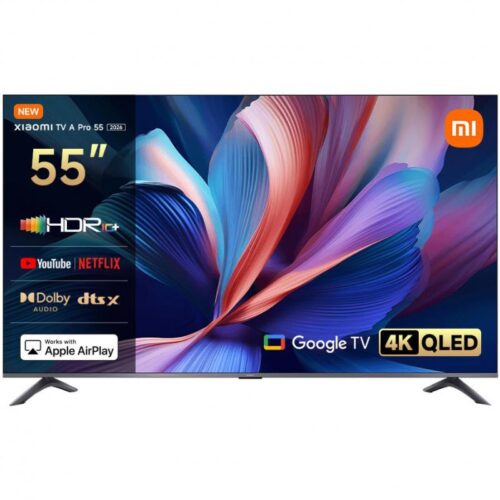
Xiaomi TV A Pro 55 (2026) 4K QLED Smart TV
Original price was: KSh 51,200.00.KSh 40,999.00Current price is: KSh 40,999.00.
Key Features
- 55-inch 4K UHD (3840 × 2160) QLED display for sharp, vibrant visuals
- 94% DCI-P3 color gamut with 1.07 billion colors for lifelike picture quality
- Supports HDR10+, HLG & Filmmaker Mode for cinematic viewing
- MEMC technology (4K 60Hz) for smoother motion in fast scenes
- Game Boost mode (up to 120Hz at 1080p via HDMI) for better gaming performance
- Google TV platform with access to apps like YouTube, Netflix & more
- Built-in Google Assistant for hands-free voice control
- Dual 10W speakers with Dolby Audio, DTS:X & DTS Virtual:X
- Powered by Quad-core Cortex-A55 processor, 2GB RAM + 8GB storage
- Chromecast, Miracast & Apple AirPlay for easy screen casting
- Bezel-less metal design for a modern, premium look
- Connectivity: 3× HDMI (with eARC & ALLM), USB, Bluetooth 5.0, dual-band Wi-Fi
Kindly Note: Prices and Stock Status are Subject to Change without Prior Notice
Xiaomi TV A Pro 55 (2026) 4K QLED smart TV in Kenya.
Xiaomi TV A Pro 55 (2026) 4K QLED smart TV price in Kenya in Kenya is at Ksh51,200.
The Xiaomi TV A Pro 55″ 2026 4K QLED Smart TV is a powerful and stylish entertainment upgrade designed for immersive viewing. Featuring a 55-inch 4K UHD QLED display, it delivers exceptional clarity, vivid colors, and enhanced contrast with support for HDR10+ and a wide DCI-P3 color gamut. The ultra-slim bezel-less design adds a premium touch while maximizing your viewing area. Powered by Google TV, it gives you seamless access to your favorite streaming apps, personalized recommendations, and voice control via Google Assistant. With smooth motion technology (MEMC) and Game Boost mode for enhanced responsiveness, it’s ideal for movies, sports, and casual gaming. Complemented by dual 10W speakers with Dolby Audio and DTS Virtual:X, this TV offers a complete cinematic experience right in your living room
Buy Xiaomi TV A Pro 55 (2026) 4K QLED smart TV Best Price Online from Starmac Kenya,Nairobi.
Related products
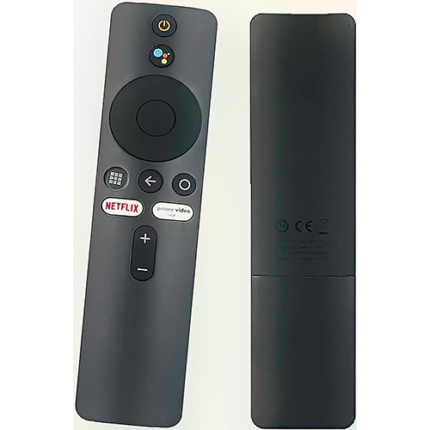
Xiaomi Tv Stick/ Box Remote
- [Pairing Instructions] 1 First, turn on the Xiaomi TV or Box manually. Place the remote control near the Xiaomi TV or box and at the same time press and hold the red wireframe button underneath for 15-30 seconds.
- [Pairing Guide] 2 After the TV displays the pairing interface, release the button and wait for the TV to display
- [Pairing Instructions] 3 the successful pairing. It can be used normally. If pairing is unsuccessful, please repeat the above steps.
- Remote control for Xiaomi Mi TV Stick/MI BOX 4S 4K
- Operation with 2 AAA batteries (not included)
