


Apple AirTag (Single)
KSh 6,499.00

Amazon Fire TV Stick Lite
Original price was: KSh 5,999.00.KSh 4,999.00Current price is: KSh 4,999.00.
Xiaomi Mi TV Stick
KSh 5,999.00
- 1GB RAM
- 8GB ROM
- 1080P HDR
- Quad Core 64 Bit
- Android 9.0
Kindly Note: Prices and Stock Status are Subject to Change without Prior Notice
Description
Xiaomi Mi TV Stick in Kenya
Xiaomi Mi TV Stick Price in Kenya is Ksh.5,499. The Xiaomi Mi TV Stick, powered by Android TV 9.0, offers quick setup in three steps, voice-controlled Google Assistant, Chromecast support, and dedicated buttons for Netflix and Amazon Prime Video. The package includes a remote, TV Stick, HDMI cable, power adapter, and user manual.
- Light and Portable: At less than 30g, the TV stick weighs no more than a cherry tomato and is small enough to easily fit in your pocket. Forget about cables, plug the stick into any TV, monitor or projector with an HDMI port to turn it into a smart TV!
- Easy to set up: Set up your Mi TV Stick in an instant. Just three easy steps to get going and you can start enjoying everything the Mi TV stick has to offer in no time!
- Limitless Entertainment: download your favorite streaming and gaming apps and stay entertained for hours.
- Smarter Experience with Android TV: Mi TV Stick is powered by Android TV 9.0 which supports voice search connecting you to a world of content. Catch up on your favorite TV shows, play games, watch the news or turn on the radio. Mi TV Stick also recommends videos based on your personal Youtube and Google Play preferences!
- Bluetooth remote: No more typing. Press the mic button on your remote to quickly find what you’re looking for, whether you’re searching for your favorite show, song or asking about the weather.
GET Xiaomi Mi TV Stick at the best price in Nairobi,Kenya from Starmac Technologies.
Shipping and Delivery
Related products
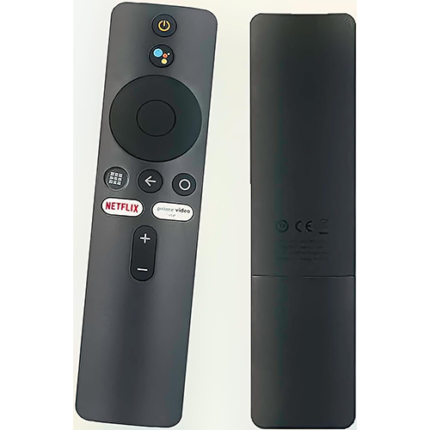
Xiaomi Tv Stick/ Box Remote
- [Pairing Instructions] 1 First, turn on the Xiaomi TV or Box manually. Place the remote control near the Xiaomi TV or box and at the same time press and hold the red wireframe button underneath for 15-30 seconds.
- [Pairing Guide] 2 After the TV displays the pairing interface, release the button and wait for the TV to display
- [Pairing Instructions] 3 the successful pairing. It can be used normally. If pairing is unsuccessful, please repeat the above steps.
- Remote control for Xiaomi Mi TV Stick/MI BOX 4S 4K
- Operation with 2 AAA batteries (not included)