


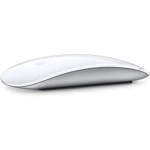

Logitech MX Master 3S
Original price was: KSh 15,400.00.KSh 15,000.00Current price is: KSh 15,000.00.
- 2.4 GHz RF & Bluetooth LE Connectivity
- 8000 dpi Darkfield Optical Sensor
- Quiet Click Buttons
- MagSpeed Electromagnetic Scrolling
- Logi Options+ Compatible
- Up to 70 Days Battery Life
- Logi Bolt USB Receiver Included
- Compatible with Multiple Platforms
Kindly Note: Prices and Stock Status are Subject to Change without Prior Notice
Logitech MX Master 3s in Kenya
Logitech MX Master 3s price in Kenya is Ksh 15,000. Stay comfortable and productive with the black Logitech MX Master 3S Wireless Mouse by your side. Updated with an 8000 dpi Darkfield optical sensor, this versatile mouse is designed to provide precise tracking on almost any surface, including glass. At the same time, its Quiet Click buttons provide a satisfying feel while producing 90% less noise than the original MX Master, and the MagSpeed scroll wheel provides fast yet precise scrolling at up to 1000 lines per second. The ergonomic design fits most right hands and includes a convenient thumb rest area where you can quickly access buttons and a side scroll function. Enhance your workflow by using the Logi Options+ software for Windows and macOS to customize the MX Master 3S buttons with different functions. Buy Logitech MX Master 3S at the best price in Kenya from Starmac.
Logitech MX Master 3S specs and price
| Connection | Wireless (2.4 GHz or Bluetooth Low Energy) | |
| Sensor | 8K DPI sensor | |
| DPI | 200 – 8,000 DPI (in 50 DPI increments) | |
| Buttons | 7 | |
| Special features | MagSpeed scroll wheel with SmartShift, thumbwheel, Logitech Flow | |
| Shape | Right-handed | |
| Battery | Rechargeable (500 mAh) lithium-polymer battery | |
| Battery life | Up to 70 days on a full battery charge | |
| Size | 124.9 x 84.3 x 51 mm (H x W x D) | |
| Weight | 141 g | |
| Colors | Black, Graphite, Light Gray | |
| Scope of delivery | MX Master 3S mouse | USB-A receiver
USB-C charging cable Instruction manual |
| Price in Kenya | Ksh 15,400 |
About the Logitech MX Master 3s Wireless Mouse
Introducing Quiet Clicks – create, make and do with the same click feel, but less noise. Quiet Clicks deliver satisfying, soft tactile feedback with 90% less click noise Compared to MX Master, MX Master 3S has 90% less Sound Power Level left and right-click, measured at 1m. Add that to a remarkably quiet MagSpeed electromagnetic scroll wheel for a high-performance experience with zero distraction. The MX Master 3s comes in color Black, Graphite, and Light Gray
8K dpi any-surface tracking
MX Master 3S is outfitted with our most accurate sensor ever, with next-gen precision and responsiveness. The 8,000 DPI optical sensor tracks virtually anywhere – even on glass mm minimum glass thickness. You can adjust your tracking sensitivity in Logi Options+ Requires Logi Options+ software, available for Windows and macOS, and set the right level for your workflow and monitor resolution.
Scroll 1,000 lines per second
MagSpeed Electromagnetic scrolling is precise enough to stop on a pixel and quick enough to scroll 1,000 lines per second. Oh, and it’s nearly silent. The wheel’s machined steel gives it a premium tactility and enough weight to offer dynamic inertia you feel – but don’t hear.
Upgrade your workflow
Work between devices and operating systems, customize individual buttons, set app-specific customizations, optimize nearly every action of your workflow, and set tracking speed in Logi Options+ Requires Logi Options+ software, available for Windows and macOS.
Countless customizations
MX Master 3S is fully customizable in virtually every app you use. You’ll work faster with predefined customizations optimized for your favorite apps such as Adobe Photoshop, Adobe Premiere Pro, Final Cut Pro, Google Chrome, Safari, Zoom, Microsoft Teams, Word, Excel, PowerPoint, and Edge.
Work seamlessly
Logi Options+ lets you flow between computers by simply moving your cursor to the edge of the screen. Your MX keyboard follows your MX Master 3S and lets your workstream flow between Windows and macOS Requires Logi Options+ software, available for Windows and macOS. Effortlessly transfer text, images, and files between computers – just copy on one and paste to the other.
Charge quickly, connect instantly
MX Master 3S stays powered for up to 70 days on a full charge – and gets three hours of use from a one-minute quick charge. Battery life may vary based on user and computing conditions. Use the included USB-C charging cable to top up the power.
MX Master 3S is compatible with all major operating systems19Device basic functions will be supported without software for operating systems other than Windows and macOS right out of the box such as Windows, macOS, Chrome OS™, or Linux®. Your mouse instantly pairs with up to three devices via Bluetooth Low Energy or the included Logi Bolt USB Receiver Not compatible with Logitech Unifying technology.
Hand sculpted all-day comfort.
Work comfortably with an ergonomic silhouette crafted to support your palm and fingers. Textured surfaces provide a confident grip for total control. The unique tilt angle of MX Master 3S positions your arm in a more natural posture for better comfort.
Optimally placed thumb controls are positioned for quick, intuitive access and fast navigation. The side scroll wheel follows the natural movement of the thumb for fluid and intuitive horizontal navigation.
Made with recycled plastic
The plastic parts in MX Master 3S include certified post-consumer recycled plastic —27% for Graphite and 22% for Pale Grey — to give a second life to end-of-life plastic from old consumer electronics and help reduce our carbon footprint.*Excludes plastic in printed wiring assembly (PWA), receiver, wire, FFC cable, and packaging.
Responsible packaging
The paper packaging of MX Master 3S comes from FSC®-certified forests and other controlled sources. By choosing this product, you are supporting responsible management of the world’s forests.
Certified carbon neutral
Rest easy knowing that the carbon footprint of your MX Master 3S has been reduced to zero. That’s because beyond designing for sustainability, we also offset our residual impact by supporting forestry, renewables, and climate-impacted communities that reduce carbon.
In the Box
- Mouse
- Logi Bolt USB receiver
- USB-C charging cable (USB-A to USB-C)
- User documentation
Visit the official website to learn more.
Related products
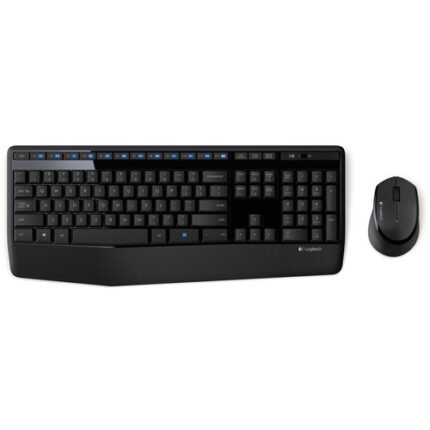
Logitech Wireless Keyboard & Mouse MK345
- Full-Size Keyboard with Number Keys
- 12 Enhanced Function Keys
- Wireless Right-Handed Optical Mouse
- 2.4 GHz Wireless Connectivity
- Nano-USB Receiver Stores Inside Mouse
- Auto Sleep Mode When Not in Use
- 3-Year Keyboard Battery Life
- 18-Month Mouse Battery Life
- Batteries Included and Pre-Installed
- Compatible with Windows and Chrome OS
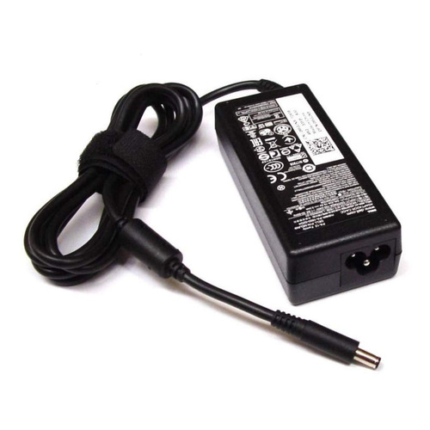
Dell 19.5V 3.34 A, 4.5 x 3.0mm Laptop Original Adaptor Charger
- Output Capacity: 19.5V 3.34A
- Power 65 W
- Input Volt Range: 100~240V /50-60 HZ
- Pin Size 4.5mm*3.0mm.
- Colour: black
- Compatible With Dell Part Number: PA-12, HA65NS-00, LA65NS2-01, DA65NM111-00, LA65NE1-00, FA65NE1-00, PA-2E, 310-2860, 928G4, A00008, AA22850, 450-18066, 450-18463, RFRWK, 44PV8, 450-18463, 450-AECO.
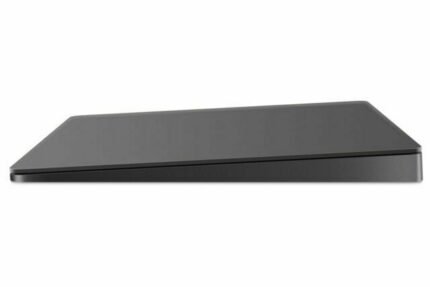
Apple Magic Trackpad 2 Silver
- Redesigned and rechargeable, Magic Trackpad 2 includes a built-in battery and brings Force Touch to the desktop for the first time.
- Four force sensors underneath the trackpad surface allow you to click anywhere, and detect subtle differences in the amount of pressure you apply, bringing increased functionality to your fingertips and enabling a deeper connection to your content.
- Magic Trackpad 2 also features an edge-to-edge glass surface area that is nearly 30 per cent larger than the previous trackpad. This design, along with a lower profile, makes scrolling and swiping through your favorite content more productive and comfortable than ever.
- Magic Trackpad 2 pairs automatically with your Mac, so you can get to work right away.
- System Requirements- Bluetooth 4.0-enabled Mac computer with OS X v10.11 or later

Microsoft Surface Pro Keyboard
| Supported platforms |
Surface Pro
Surface Pro 4
Surface Pro 3
|
|---|---|
| Dimensions | 11.60 x 8.54 x 0.20 in (295 x 217 x 5 mm) |
| Weight | 0.68 lbs (310 g) |
| Keys |
Activation: Moving (mechanical) keys
Layout: QWERTY, full row of function keys (F1-F12)
Windows key and dedicated buttons for media controls, screen brightness
Rick-click button
|
| Interface | Magnetic |
| Sensors |
Fingerprint reader
Accelerometer
|